
Remote Access Cameras: Mastering Secure Monitoring 2026
If you manage property you can’t be at all day — a second retail location, a construction site, a parking lot, a warehouse with an unmonitored loading dock — remote camera monitoring isn’t a convenience feature. It’s the difference between finding out about a problem in real time and finding out about it the next morning.
I’m Chris Edens. My background is corporate security work plus time in the military, and most of what’s below comes from setting up remote monitoring for businesses managing sites they visit once a week, not once a day.
What “Remote Monitoring” Actually Means for a Business
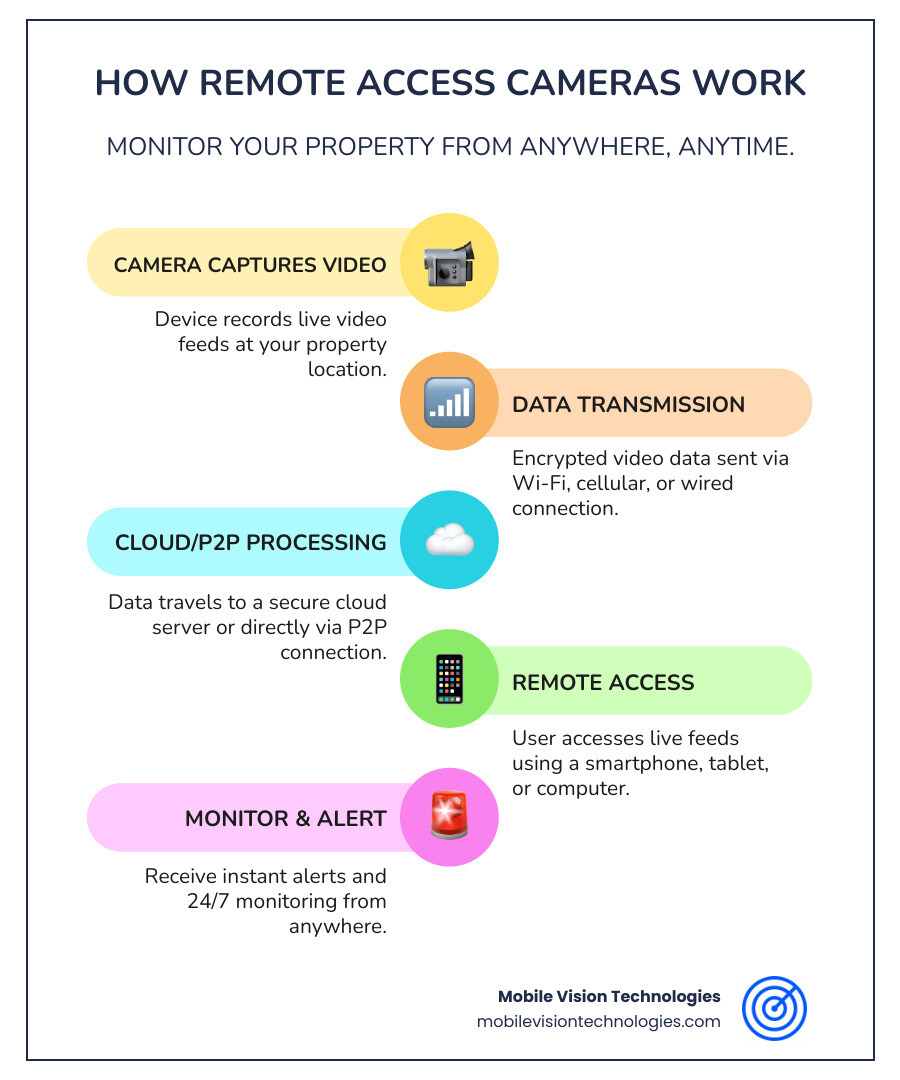
At a basic level, it’s the ability to view live and recorded footage from any of your properties from a phone or browser, anywhere there’s a signal. For a single-location business that’s a nice-to-have. For a business managing multiple sites, a construction project, or any property without full-time staff on-site, it’s the core of how the security system actually functions day to day — because nobody’s there to watch a monitor.
The practical difference between a residential setup and a real business deployment comes down to three things: how the system connects (especially on sites with no existing internet), how footage is stored and who can access it, and whether anyone besides you is actually watching it.
Connectivity: The Part That Actually Matters for a Business Site
Wi-Fi-dependent systems are fine for a location that already has reliable internet. They’re a poor fit for a construction site, a new lot before buildout, or any location where you don’t control the network.
Cellular-connected systems (4G/5G) solve that problem by not depending on site infrastructure at all. This is the right call for most business deployments outside a single, already-wired office or storefront — a system that requires existing Wi-Fi is a system that doesn’t work on half the sites that actually need it.
Wired systems (PoE) remain the most stable option for a permanent facility that already has the infrastructure, but they’re the wrong tool for anything temporary or evolving.
Storage and Access: Who Can See What, and For How Long
- Local storage (SD card, NVR/DVR) keeps footage on-site. Cheap, but vulnerable — if the unit is stolen or damaged, the footage usually goes with it.
- Cloud storage keeps a copy off-site, accessible from anywhere, and protected if the physical hardware is compromised. For any site without daily staff presence, this isn’t optional — it’s the only way to guarantee you still have footage after an incident.
- Access control matters more with multiple locations. A single owner checking one camera feed is a different problem than a regional manager who needs visibility into six sites without also needing admin access to change settings at all of them. Make sure whatever system you choose supports role-based access, not just a shared login.
AI Detection: The Feature That Actually Reduces the Workload
The value of AI-powered motion detection isn’t the AI buzzword — it’s that a system that can tell the difference between a person, a vehicle, and a plastic bag blowing across a parking lot is a system that doesn’t bury you in false alerts. For a business managing multiple properties, alert fatigue is a real failure mode: if a system generates enough noise, people stop checking it. Object/vehicle/person classification is the feature that keeps a remote system actually useful instead of becoming background noise.
Self-Monitoring vs. Professional Monitoring
- Self-monitoring means you or your team review alerts and decide what to do. Workable for a single site with someone reasonably responsive during business hours.
- Professional central-station monitoring means a trained analyst reviews every alert, verifies it against live footage, and dispatches a response if warranted. This is the right call for remote sites, overnight coverage, or any property where a delayed response has real cost — an active construction site or an unmonitored lot after hours, for example.
For multi-site businesses specifically, professional monitoring also solves an internal problem: it removes the burden of “whoever happens to see the alert first” from your own staff.
Security Practices That Matter More at Business Scale
A few things worth taking seriously beyond the basics of a strong password:
- Unique credentials per site or per user, not one shared login across every location and every manager.
- Two-factor authentication on the monitoring platform itself, not just the Wi-Fi router.
- Network segmentation for any site where cameras sit on the same network as point-of-sale systems or other sensitive infrastructure — cameras should be isolated from anything you can’t afford to have compromised.
- Firmware and platform updates applied consistently across every site, not just the one someone happens to remember.
Legal and Privacy Considerations
- Camera placement should stay focused on your own property. Footage that captures neighboring private property or public areas beyond what’s reasonably necessary for your site creates liability independent of whether it’s technically legal.
- Audio recording consent laws vary by state — some are one-party consent, some require all-party consent. If any of your locations capture audio, this is worth checking per state, not assuming it’s the same everywhere you operate.
- Employee notification matters for any interior workplace cameras — most states expect employees to know they may be recorded.
Where This Shows Up in Practice
Multi-location retail or commercial businesses use remote monitoring to check every site from one dashboard instead of relying on whichever manager happens to notice something. Our multi-location security solutions page covers how centralized monitoring works across several properties at once.
Construction sites are the clearest case for cellular-connected remote monitoring, since there’s usually no existing network to depend on. See our construction site surveillance page for how this plays out on active builds.
Warehouses and loading docks often have coverage gaps at exactly the points — docks, yards, overnight storage — that don’t have a person stationed nearby. Our warehouse security page covers this specifically.
Getting Remote Monitoring Set Up for Your Properties
Whether you’re adding remote access to an existing system or building out coverage for a new site, our AI-powered video surveillance and mobile video surveillance systems are built for exactly this — cellular connectivity, cloud storage, and role-based access designed for people who can’t be on-site all day. Request a free quote and we’ll walk through what fits your properties.